Editable Office Tasks Planner for KDP: Simplify Your Workflow
Keeping daily tasks, project timelines, and meeting notes organized is something many professionals and creators struggle with. The Editable Office Tasks Planner for KDP offers a practical solution, especially if you're looking to publish your own planner interiors on Amazon. This ready-made template bundle gives you high-quality, print-ready PDF files that can be customized and uploaded directly to Kindle Direct Publishing without starting from scratch.
What Exactly Is the Editable Office Tasks Planner for KDP?
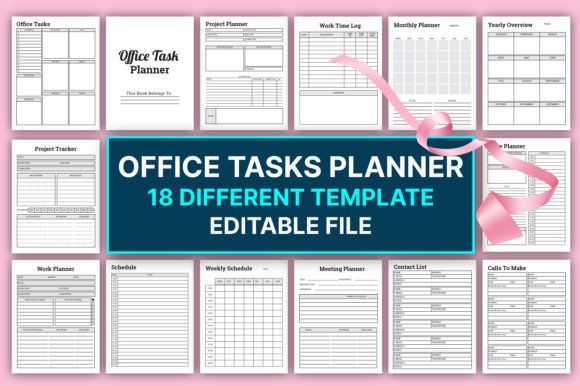
At its core, this product is a collection of editable planner pages designed specifically for KDP interiors. Instead of designing every calendar, to-do list, or log sheet yourself, you get a professionally structured 20-page document with 18 different templates. Each page measures 8.5 x 11 inches — a standard size that Amazon customers expect. The files come in CMYK color mode at 300 PPI, with no bleed area, which means they meet KDP's exact technical requirements for crisp, professional printing.
What makes this planner special is that it is editable. You can open the file in software like Adobe Acrobat, Illustrator, or even free programs like Canva, then tweak fonts, colors, or layouts to match your brand. This flexibility allows you to create a unique office planner that stands out in a crowded marketplace, while still relying on a solid, tested foundation.
Why a Structured Planner Interior Matters for KDP Success
Many first-time KDP publishers underestimate how much work goes into creating a seamless planner interior. Randomly arranged pages, inconsistent margins, or off-spec color profiles can lead to poor reviews or even rejections from Amazon. The Editable Office Tasks Planner for KDP removes that guesswork. The templates are already KDP tested, meaning the layout, margins, and color settings are optimized for both digital viewing and physical printing.
When you use a print-ready interior, you also save hours of formatting time. Instead of fiddling with alignment, you can focus on adding your personal touch — maybe a custom cover, a branded welcome page, or extra note sections. This shifts your energy from technical troubleshooting toward building a product that feels both professional and personal.
Inside the 18 Templates: A Quick Walkthrough
The bundle includes every essential page an office worker, freelancer, or entrepreneur might need. Here are some highlights that show how thorough the set is:
- Project Planner & Tracker: Break down large goals into actionable steps with timelines and progress markers.
- Daily, Weekly, and Monthly Planners: Cover short-term scheduling and long-term overviews in one cohesive system.
- Work Time Log & Work Journal: Track billable hours or reflect on daily accomplishments.
- Meeting Planner & Meeting List: Prepare agendas, note action items, and archive past discussions.
- Contact List & Calls to Make: Keep important contacts and outreach tasks in a dedicated spot.
- Password Tracker, Notes, and Yearly Overview: Secure sensitive information while maintaining a high-level view of the entire year.
Each template serves a distinct purpose, yet they all flow together visually. This consistency is a huge selling point for customers browsing Amazon, because it suggests a well-thought-out product. With the Editable Office Tasks Planner For KDP Interiors, you're not just selling random pages — you're offering a complete organizational toolkit.
Who Benefits Most from This Planner Bundle?
The obvious audience is KDP sellers who want to expand their low-content book catalog. Whether you're a seasoned publisher or just starting out, having a pre-made, editable interior slashes your production time. You can take the same set, make minor adjustments, and release multiple variations (e.g., minimalist, floral, corporate) under different niches.
However, the appeal extends beyond publishers. Freelancers, virtual assistants, and small business owners might purchase this file simply to print and use for themselves. After all, it's a comprehensive office management system at a fraction of the cost of hiring a designer. Educators and coaches can adapt the templates into student planners or client workbooks. Even bloggers and content creators who sell digital products as a side income find that a print-ready office tasks planner opens up a new revenue stream without the complexity of graphic design.
Practical Example: Launching Your First KDP Planner
Imagine you want to create an "Ultimate Office Productivity Planner." You download the editable file and immediately see all 20 pages laid out. You decide to keep the core structure but add a soft blue color scheme and a cursive font for section headers. You insert a custom cover that you designed in Canva. Within a couple of hours, you have a unique product that aligns with your brand. After exporting the final PDF, you upload it to KDP, set a price, and hit publish — all without worrying about bleed settings or margin errors.
Because the interior is already KDP tested, the chances of your book being flagged for quality issues drop significantly. This gives you confidence, especially if you're juggling multiple projects and don't have time to learn the nuances of print formatting.
Important Considerations Before You Begin
While the editable nature of this planner is a strength, it does require some familiarity with editing software. You don't need to be a professional designer, but you should know how to open a PDF in a program that supports editing. Tools like Adobe Acrobat, Affinity Publisher, or even free alternatives such as Inkscape or Canva can work, though results may vary. Always double-check that your edits don't accidentally shift page elements or alter the no-bleed layout.
Another point to keep in mind is the CMYK color profile. If you change colors, make sure you stay in CMYK mode to avoid dull or unexpected prints. The original file is set up correctly, but careless RGB edits can lead to customer complaints about faded pages. Also, while the templates are thorough, they are not a magic bullet — the final product's appeal still depends on your creativity, your cover design, and how well you market the planner on Amazon.
Using the Planner Beyond Amazon KDP
The Editable Office Tasks Planner for KDP is designed with KDP in mind, but its applications go further. Corporate teams might adapt it as an internal project management tool. Remote workers could use a tailored version as a digital PDF planner on their tablets with annotation apps like GoodNotes or Notability. Coaches can repurpose the pages into client onboarding kits. Even nonprofit organizations find value in printing these templates for board meeting minutes or volunteer scheduling. The 8.5 x 11 inch size and clean layouts translate well into almost any office environment.
Why Print-Ready Files Matter for a Polished Product
The phrase print-ready PDF isn't just a buzzword. It means the file has been flattened, fonts are embedded, and images are at the correct resolution. This planner set boasts 300 PPI, which is the industry standard for sharp text and graphics. The absence of a bleed area simplifies your job: you can design right up to the edge of the page without worrying about trimming, but it's still wise to keep critical content within safe margins. The no-bleed setup also means buyers who print at home won't have to adjust their printer settings, reducing frustration.
All these technical details might sound minor, but they collectively shape the customer experience. A well-formatted planner feels substantial and worth the price. One that prints poorly, with misaligned grids or fuzzy text, invites returns and negative reviews. The Editable Office Tasks Planner For KDP Interiors is built to avoid those pitfalls.
Customization Ideas to Stand Out
Even though the templates are ready to use, a little creativity goes a long way. Try these approaches:
- Add a motivational quote at the bottom of each weekly spread.
- Incorporate subtle icons or line art that match a seasonal theme (e.g., autumn leaves or spring flowers).
- Create a "bonus page" with goal-setting prompts or a habit tracker to increase perceived value.
- Adjust the "Password Tracker" page into a "Software Licenses" log for IT professionals.
- Translate the entire planner into another language to tap into non-English markets on Amazon.
Small tweaks like these help you avoid the "generic template" look, which can be a dealbreaker for discerning customers. Remember, the editable file is your starting point — you're free to mold it into something that resonates with your target audience.
Common Questions Buyers Have (and Honest Answers)
When considering this type of product, people often wonder about the learning curve. The truth is, if you've ever edited a simple document in Word or customized a Canva template, you'll manage just fine. The file structure is straightforward, and most changes are cosmetic. Another concern is whether the templates feel outdated. The clean, functional design is intentionally neutral, making it a solid base for both modern and classic styles. Because you're not locked into a single decorative theme, you can reinvent the planner again and again.
There's also the question of saturation. Office planners are popular on KDP, but a high-quality, editable interior still gives you a significant advantage. You can launch multiple versions quickly, test different niches, and scale what works — without redesigning from scratch each time.
Ultimately, the Editable Office Tasks Planner for KDP is a tool that bridges the gap between a blank page and a market-ready product. It respects your time, meets Amazon's requirements, and invites you to add your own creative stamp. Whether you're building a publishing business or just need a personal organizational system, this bundle offers a solid, dependable place to start.